Inviting a new user to a folder
You need to be an owner of the folder, to be able to invite other users to a folder.
Click on the folder, then click the Edit Folder button next to the breadcrumb bar above:

Note: You can only edit one folder at one time.
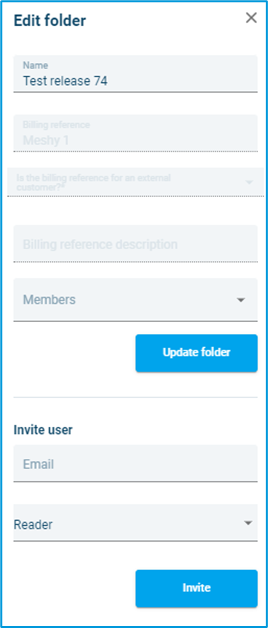
Once you have clicked on Edit, you will see a menu to edit the folder. Scroll down to the section Invite user. Enter the new user’s email address and select their role from the menu (owner, contributor or reader).
Note: For more details about the roles please go to Chapter 2: Access to Cloud Admin.
An invitation email is sent to the email address of the newly added user. The new user needs to accept the email invite to be able to access the folder.
Note: Users invited from a specific folder will only have access to the specific Folder they were invited to. It is also possible to invite an external user (who is not part of the company) to a Folder.